Sales Management Admin Dashboard: A Strategic Foundation for Growth
In the modern digital economy, data is abundant, but insight is scarce. The bridge between raw numbers and actionable strategy is often a well-designed interface. This is where a Sales Management Admin Dashboard becomes critical. It is not merely a collection of charts or a visual representation of revenue; it is the command center for operational clarity. For entrepreneurs, marketing directors, and business owners, the ability to visualize sales pipelines, track team performance, and forecast outcomes in real-time dictates the speed and accuracy of decision-making. A robust dashboard transforms complex datasets into a coherent narrative, allowing leaders to pivot strategies before minor issues become major setbacks.
The Strategic Value of Visualizing Sales Data
Why invest time and resources into a dedicated Sales Management Admin Dashboard? The answer lies in cognitive load reduction. When sales teams and managers are buried under spreadsheets and disparate CRM reports, they lose sight of the bigger picture. A centralized dashboard aggregates this information, presenting key performance indicators (KPIs) such as conversion rates, average deal size, and customer acquisition costs in an intuitive format. This visual consolidation allows stakeholders to identify trends instantly rather than spending hours compiling reports.
Furthermore, a strategic dashboard supports long-term planning by highlighting seasonal fluctuations and recurring bottlenecks. For instance, if a dashboard reveals that leads from a specific channel consistently drop off at the proposal stage, management can immediately investigate the root cause—whether it be pricing, product-market fit, or sales training gaps. Without this visual aid, such patterns might remain hidden within rows of unanalyzed data, delaying corrective action for months. The Sales Management Admin Dashboard thus serves as an early warning system, ensuring that business operations remain agile and responsive to market dynamics.
Integrating Design Excellence with Functional Utility
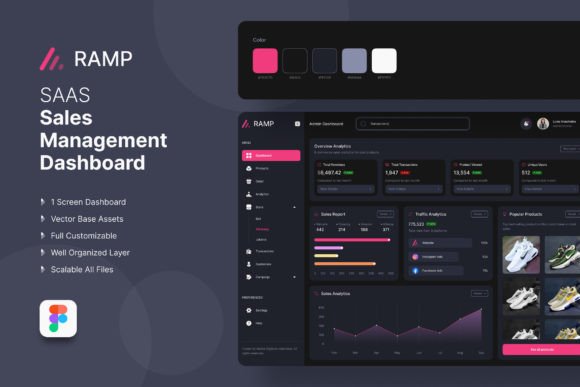
The effectiveness of any administrative tool depends heavily on its usability. A cluttered, confusing interface discourages adoption, rendering even the most sophisticated data useless. This is why the design foundation matters. Professional templates created in tools like Figma offer a distinct advantage by prioritizing clean organization and logical flow. When a dashboard is fully layered, retina-ready, and organized with vector shapes, it ensures that the final web application is not only visually appealing but also technically efficient.
Consider the impact of a "very clean organized" layout on user productivity. When elements are clearly labeled and arranged logically, users spend less time searching for information and more time analyzing it. Features such as easy-to-change color modes (RGB) and flexible assets allow businesses to align the dashboard with their brand identity without compromising functionality. Whether you are building a custom admin panel for a SaaS platform, an e-commerce site, or a corporate HRMS, the underlying structure must support rapid iteration. A template that is easy to modify means that as your business goals evolve, your dashboard can adapt without requiring a complete rebuild.
Applying the Dashboard Across Business Verticals
While the name suggests a focus on sales, the principles behind a Sales Management Admin Dashboard are universally applicable across various sectors. The core requirement for any business—be it a startup, a large corporation, or a freelance operation—is visibility into performance. In the context of a Customer Relationship Management (CRM) system, this dashboard tracks interactions, follow-ups, and pipeline health. However, the same structural logic applies to Content Management Systems (CMS), Support Social Portals, and Human Resource Management Systems (HRMS).
- E-commerce: Here, the dashboard monitors inventory levels, order fulfillment times, and cart abandonment rates alongside sales figures.
- SaaS Platforms: Focus shifts to Monthly Recurring Revenue (MRR), churn rates, and user engagement metrics, all visualized through the same clean, organized interface.
- Corporate & Personal Business: For smaller entities, the dashboard simplifies financial tracking and project management, offering a bird's-eye view of cash flow and task completion.
The versatility of a well-structured template means that whether you are managing a global supply chain or a small creative agency, the mechanism for decision-making remains consistent. By utilizing a design that is 1920 w × 1665 h px and optimized for high-resolution displays, you ensure that these insights are accessible on modern devices, facilitating remote work and distributed team collaboration.
Planning for Implementation and Customization
Adopting a new dashboard requires more than just downloading a file; it demands a strategic approach to implementation. Before integrating a Sales Management Admin Dashboard, organizations must define what success looks like. What specific questions need answering? Is it "How many deals closed last week?" or "Which sales rep has the highest conversion rate?" Once these goals are clear, the customization process becomes targeted.
Using a professionally created Figma file offers significant flexibility here. Because the document uses free fonts from Google Fonts and maintains a fully layered structure, designers and developers can easily swap out colors, shapes, and effects to match specific branding guidelines. This modularity is crucial for maintaining brand consistency across all digital touchpoints. For example, changing the primary color palette to reflect a rebranding initiative should not require rewriting code or restructuring the entire UI. The "easy to change" nature of these assets accelerates deployment timelines, allowing businesses to launch updated interfaces faster.
Moreover, the inclusion of essential components like Calendar views, Mail notes, and Asset libraries within the template ensures that communication and scheduling are integrated directly into the workflow. This reduces context switching, a common productivity killer. When a sales manager can see an upcoming client meeting on the calendar while reviewing the associated deal value on the dashboard, they are better prepared for the interaction, leading to improved customer experiences and higher close rates.
Risks of Adopting Dashboards Without Clear Goals
Despite the benefits, there are risks associated with implementing a Sales Management Admin Dashboard without a clear strategic framework. One common pitfall is "analysis paralysis," where teams become overwhelmed by too much data. If a dashboard displays every possible metric without prioritizing the ones that drive business outcomes, it creates noise rather than signal. Leaders may find themselves staring at beautiful charts that do not inform actual decisions.
Another risk is the false sense of security. A polished interface does not guarantee accurate data. If the underlying data sources are flawed or inconsistent, the dashboard will simply present errors beautifully. It is imperative to validate data integrity before relying on the visualizations for high-stakes decisions. Additionally, organizations must avoid treating the dashboard as a static report. The true power lies in its interactivity and real-time updates. Using it merely as a historical record misses the opportunity to influence current and future actions.
There is also the danger of over-customization. While the flexibility of Figma files allows for extensive changes, altering the fundamental logic of the dashboard to suit personal preferences rather than business needs can degrade its utility. Every element added should serve a purpose. If a widget does not help answer a critical business question, it should be removed to maintain the "very clean organized" standard that drives efficiency.
Maximizing Long-Term Results Through Intentional Use
To derive maximum value from a Sales Management Admin Dashboard, businesses must adopt an intentional mindset. This means regularly reviewing the dashboard not just for status updates, but for strategic alignment. Are the current metrics still relevant to the company's annual goals? If the business has shifted focus from volume to profitability, the dashboard should be adjusted to highlight margin analysis rather than total units sold.
Training is another vital component. Even the best-designed interface is ineffective if the team does not know how to interpret the data. Investing in training sessions that explain how to read the charts, understand the trends, and act on the insights ensures that the tool becomes a catalyst for growth rather than a decorative feature. Furthermore, fostering a culture of data-driven decision-making encourages employees to use the dashboard proactively. When everyone from the sales floor to the C-suite relies on the same source of truth, communication improves, silos break down, and organizational alignment strengthens.
Ultimately, the goal is to create a feedback loop where the dashboard informs strategy, strategy drives action, and action generates new data. This cycle of continuous improvement is what separates thriving businesses from stagnant ones. By leveraging a professional, flexible, and strategically sound Sales Management Admin Dashboard, organizations position themselves to navigate complexity with confidence. Whether you are managing a complex SaaS ecosystem or a simple e-commerce store, the right dashboard provides the clarity needed to turn potential into performance.