Business Documents Flat Outline Icons: A Practical Guide for Designers and Professionals
In the fast-paced world of digital design, clarity is often more valuable than complexity. Whether you are building a user interface for a new startup app or organizing a presentation for a quarterly board meeting, the visual language you choose dictates how your audience interacts with your content. This is where Business Documents Flat Outline Icons become an essential asset. These icons are not just decorative elements; they are functional tools designed to communicate actions, categories, and statuses instantly. By stripping away unnecessary details and focusing on clean lines, flat outline styles ensure that your message remains legible across devices, from tiny mobile screens to large desktop monitors.
Understanding the Value of Flat Outline Vector Graphics
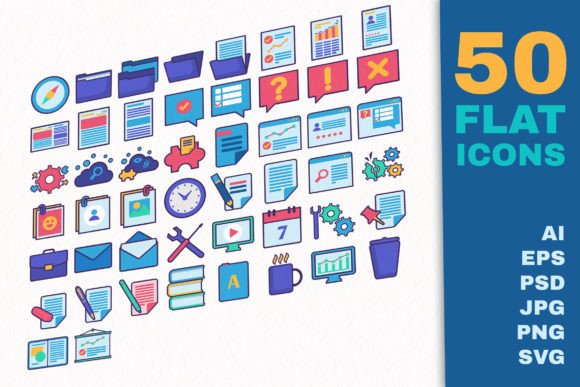
At its core, the Business Documents Flat Outline Icons set is a collection of 50 vector UI templates specifically tailored for business contexts. Unlike pixel-based images that lose quality when resized, these vectors are resolution-independent. This means you can scale them up for a billboard or down for a favicon without any loss in sharpness. The "flat outline" aesthetic is particularly effective because it reduces visual noise. In a crowded dashboard filled with data charts and text, a solid, heavy icon might feel overwhelming. An outline icon, however, integrates seamlessly, guiding the user's eye without dominating the screen.
The versatility of this set lies in its organization. It covers a comprehensive range of business activities, including file management, strategic planning, marketing efforts, research, security protocols, and cloud services. For a designer, having a cohesive library that includes everything from a simple "folder" to complex "account settings" ensures consistency throughout the project. Consistency is a cornerstone of good UX (User Experience) design; when every button and symbol follows the same visual rules, users feel more confident navigating the interface.
Real-World Applications for Entrepreneurs and Marketers
Consider the scenario of a freelance marketer launching a campaign landing page. They need to quickly convey what the user can do: download a whitepaper, upload a case study, or search through resources. Using the Business Documents Flat Outline Icons, they can implement clear call-to-action buttons. A "download" icon signals immediate access, while a "search" icon invites exploration. Because these icons are available in RGB color mode, they are easy to customize to match the brand's specific color palette, ensuring the landing page feels unified rather than generic.
For small business owners managing internal operations, these icons serve a different purpose. Imagine creating an employee handbook or an internal training portal. Visual cues help break up dense text and make information digestible. A "security" icon next to a section on data privacy immediately alerts employees to the importance of that topic. Similarly, "discount" or "strategy" icons can highlight key sections in a sales pitch deck, making the presentation more engaging for potential clients. The ability to edit these files easily allows non-designers to tweak colors or line weights to fit their corporate identity without needing advanced software skills.
Enhancing User Interfaces for Apps and Web Platforms
Developers and UI designers rely heavily on assets like the Vector Business Documents App Icons Flat Outline Set to build intuitive navigation systems. When designing a document management system, users expect to see familiar symbols for actions like "add," "delete," "preview," and "edit." If these symbols are ambiguous, users get frustrated and may abandon the platform. The 50 separate artboards included in the AI CS6 file allow designers to pick exactly the right symbol for each function, ensuring that the interaction logic is sound.
The inclusion of multiple file formats—such as SVG, PNG, PSD, and EPS—caters to various stages of the development workflow. Front-end developers can use the SVG files for crisp rendering on web pages, while graphic designers might prefer the layered PSD or AI files for further customization. The availability of high-resolution PNGs (up to 5000px) is particularly useful for print materials or high-DPI displays, ensuring that the branding remains professional regardless of the medium.
Benefits for Educators and Content Creators
Educators and bloggers also stand to gain significantly from using high-quality icon sets. When creating online courses or instructional videos, visual aids are crucial for retention. An instructor explaining "cloud service" concepts can use the corresponding icon to reinforce the lesson visually. For bloggers writing about productivity, incorporating these icons into custom graphics or infographics adds a layer of professionalism that stock photos often lack. The transparent backgrounds on the PNG files make it incredibly easy to overlay these icons onto existing images or video frames without awkward white boxes.
Furthermore, the semantic variety of the icons supports diverse topics. From "research" and "marketing" to "file actions," the set covers the broad spectrum of modern work life. A hobbyist creating a personal portfolio website can use the "account settings" or "upload" icons to create a custom admin panel look, giving their site a unique, polished feel without spending hours drawing graphics from scratch.
What to Consider Before Downloading and Using
While the Business Documents Flat Outline Icons offer immense value, there are practical considerations before integrating them into a project. First, assess your licensing needs. While the set provides extensive formats like 250 PNG files and 50 SVG files, always verify the usage rights for commercial projects, especially if you plan to resell designs derived from these assets. Second, consider the technical requirements. Although the files are well-organized, working with AI or PSD files requires compatible software like Adobe Illustrator or Photoshop. If you only have basic image editing tools, the PNG and JPG preview files will be your primary resources.
Another important factor is customization. The set is described as "easy to customize," but this assumes a basic understanding of vector editing. If you need to change the stroke weight or add specific brand marks, having the source files (AI, EPS) is critical. Relying solely on the raster PNGs limits your flexibility. Additionally, remember that the preview image and mock-up elements are not included in the download. You will need to apply these icons to your own designs to visualize the final result, which is actually a benefit as it prevents the "template look" that comes with pre-made mockups.
Streamlining Your Workflow with Organized Assets
Time is a scarce resource for creators and entrepreneurs. One of the hidden benefits of this icon set is the time saved during the design process. Instead of hunting through disparate freebie sites for matching icons, you have a complete suite of 50 related assets in one place. The logical grouping of files—separate artboards for individual icons and consolidated EPS files—means you spend less time managing files and more time executing your vision. This efficiency translates directly to faster project turnaround times, allowing you to focus on strategy and content rather than asset creation.
Ultimately, the decision to use Business Documents Flat Outline Icons is about choosing clarity and efficiency. Whether you are a developer coding a new feature, a marketer crafting a campaign, or an educator building a course, these icons provide a reliable visual vocabulary. They bridge the gap between complex functionality and user understanding, ensuring that your digital products are not only functional but also aesthetically pleasing. By leveraging these well-organized, customizable vector assets, you empower your audience to navigate your content with confidence and ease.